October 2026 Release Notes

Updated at October 7th, 2026
Table of Contents
This release brings improvements to forms, email handling, WhatsApp Groups, routing rules and customer reporting in Cirrus Digital. It also adds clearer permission error messages and stronger safeguards when configuring conversation deletion, helping agents work more efficiently and administrators manage settings with greater confidence.
Enhancements
Improved Form Approval Process
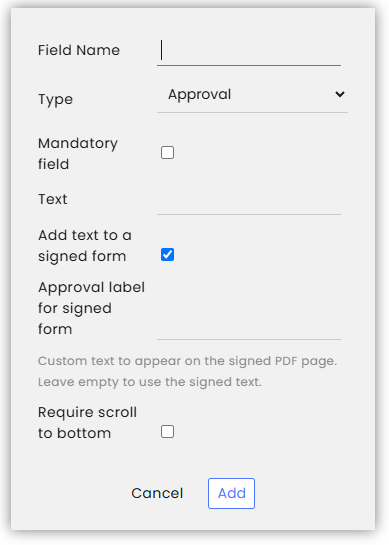
Administrators can configure two new options for the Approval field in Forms.
Add text to a signed form
This option adds a final page to the signed PDF containing the wording entered in the Text field, followed by the signing date.
The date is generated automatically using the brand’s time zone and language settings.
Require scroll to bottom
This option hides the Approval field until the customer scrolls to the bottom of the form. This encourages customers to review the content before approving it.
Both options are disabled by default, so existing Forms are unaffected.
Clearer Warnings for Conversation Deletion
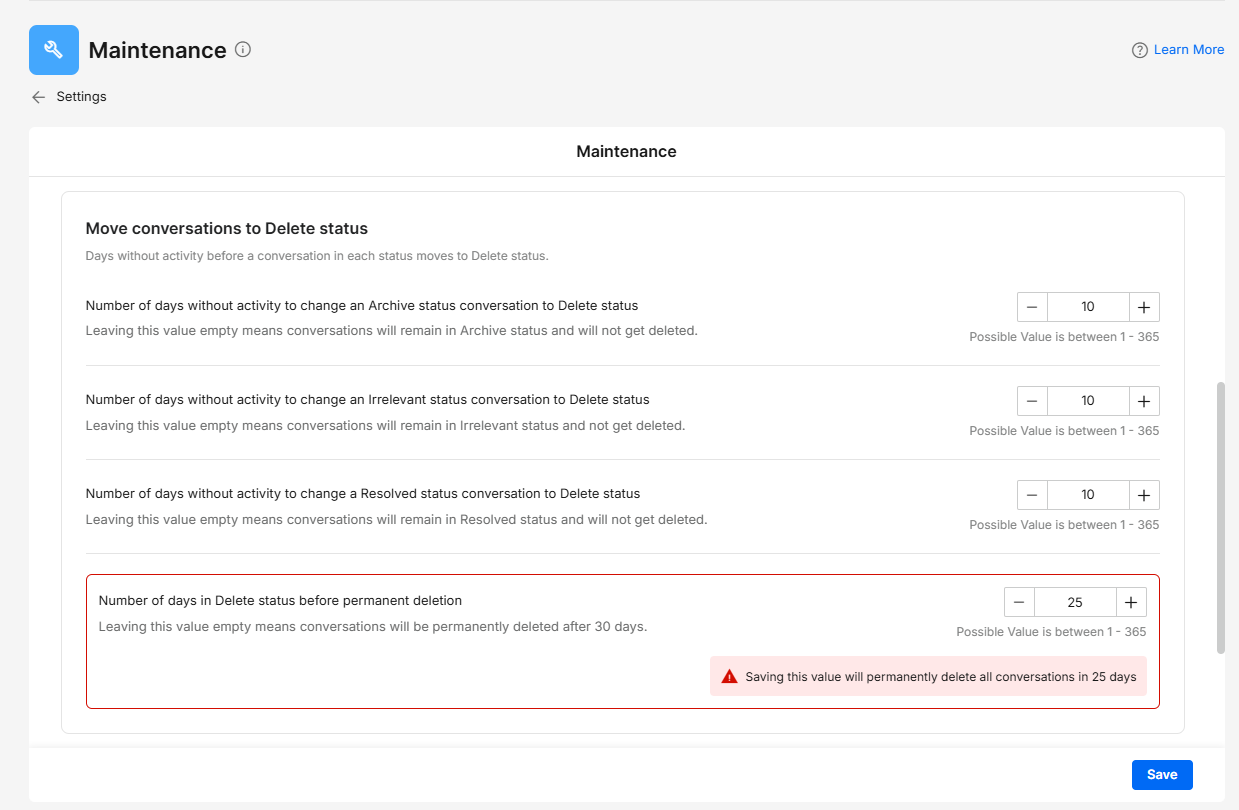
The Maintenance module now gives administrators clearer warnings when configuring conversation deletion.
The Move conversations to Delete status section explains that these settings can lead to permanent deletion of conversation data. Administrators must also confirm changes before saving any of these settings.
The confirmation explains the two stages:
- Conversations move to Delete status after the configured inactivity period.
- Conversations are permanently deleted after the configured retention period.
If no retention period is entered, the default is 30 days.
These warnings help administrators understand the impact of their settings before saving changes.
Faster Access to Email Reply Options

Agents can now access Reply All and Forward directly from the email reply toolbar, without opening the additional options menu.
Reply and Reply All are combined in a dropdown. Cirrus Digital remembers the agent’s last selection and uses it as their default reply option across conversations and sessions.
Forward is available as a separate action on the toolbar.
This reduces the number of clicks needed to handle emails with several recipients.
Keep Agent Participants in WhatsApp Groups
When a WhatsApp Group conversation is resolved and a new conversation is automatically created for the group, agent participants are now carried over to the new conversation, provided they still have access to the channel.
This keeps the same agents involved in ongoing group activity and reduces the need to add them again each time a conversation is resolved.
Please note: Split Conversation must be enabled in the channel settings. If it is disabled, agent participants are not carried over automatically after resolution and must be added again when needed.
Automatic Agent Removal from WhatsApp Groups
When an administrator removes a channel from an agent’s permission profile, the agent immediately loses access to that channel and is unassigned from its conversations.
The agent is now also removed from the conversation participant lists.
For WhatsApp Groups, this prevents agents who no longer have channel access from remaining associated with the group or being carried over to newly created conversations.
Remove Customers from WhatsApp Groups

Agents with the required permission can now remove customers from WhatsApp Groups directly from the Customers module in the main sidebar.
An agent can remove a customer from:
- One specific WhatsApp Group.
- All WhatsApp Groups the customer belongs to.
This makes it easier to manage group membership directly from the customer profile.
Access is controlled by the new Remove Customers from WA Groups permission, found under General Permissions > WhatsApp Groups.
Set the Status of Routed Conversations
The Routed conversation arrived trigger in Rules can now change a conversation’s status when it is routed to another channel or subchannel.
Administrators can select the required status, such as Open, when configuring the rule.
This helps receiving teams identify and handle incoming conversations with the appropriate status, instead of carrying over a status from the previous channel.
Reset SLA Timers Using Rules
A new Reset SLA action lets administrators restart the SLA timer automatically through Rules.
The action can be used with the following triggers:
- Routed conversation arrived
- Conversation Status Change
- Conversation Tag Was Added / Customer Tag Was Added
When the rule runs, the SLA timer resets and starts again using the destination channel’s SLA configuration.
This gives teams more control over SLA tracking when conversations move between channels with different service requirements.
Please note: The % SLA Compliance per Agent metric is unaffected by this action.
Clearer Permission Error Messages

When permissions prevent a user from saving a change, Cirrus Digital now explains the reason more clearly.
Messages distinguish between:
- Changes involving agents outside a Team Lead’s team.
- Insufficient permissions.
- Unexpected technical errors.
Unexpected errors also include a reference code that can be shared with Cirrus Support.
This helps users understand why a change was blocked and gives Support more information when investigating an unexpected issue.
Include Custom Fields in Customer Reports

Custom fields configured in the Custom Fields module can now be included in Customer Reports. Organisations can add their own customer information to exported reports alongside the standard fields.
Standard customer fields, including first name, last name and phone number, are always included. Custom fields can be added as needed.
The Custom Fields module also controls which fields are displayed or hidden in the Customer Pane.
To generate a report:
- Go to Insights > Customers.
- Select Export.
- When the report is ready, select Download.